
This post is sponsored by Crowdin.
Companies have spent years managing their translation memories, glossaries and style guides. But when they translate user-generated content, they often don’t use the data they already have. And if they do, they have to copy it somewhere else and make sure it’s always up to date.
Crowdin has two API calls for this. You send text or a file with your TM, glossary and style guide as a reference, and you get the translation back. You don’t need to create a project for it, and you don’t have to copy your data and keep it in sync.
The video is just a short demo, and below is a guide on how to use it yourself.
What I mean by user-generated content
Any content your company manages on its website or product that is created by its users, clients or partners.
For example:
restaurant menus
property listings and guest reviews
product listings and specs
comments and forum posts
support tickets and chat messages
Why not a Crowdin project?
In the past, a project was the only place in a TMS where you could pre-translate files. That’s why most teams first try to push this content into a Crowdin project, run pre-translation and pull it back out. It works, but a project was made for something else, and it can be too slow.
So instead, a lot of teams just call DeepL, Google or an LLM directly. It’s faster, but your glossary, TM and style guide stay in your TMS, and the engine never sees them.
For content you own, a project is still the right place: UI, marketing pages, legal text, help center, anything that needs human review and a workflow. The two API calls below are for everything else.
Two API calls
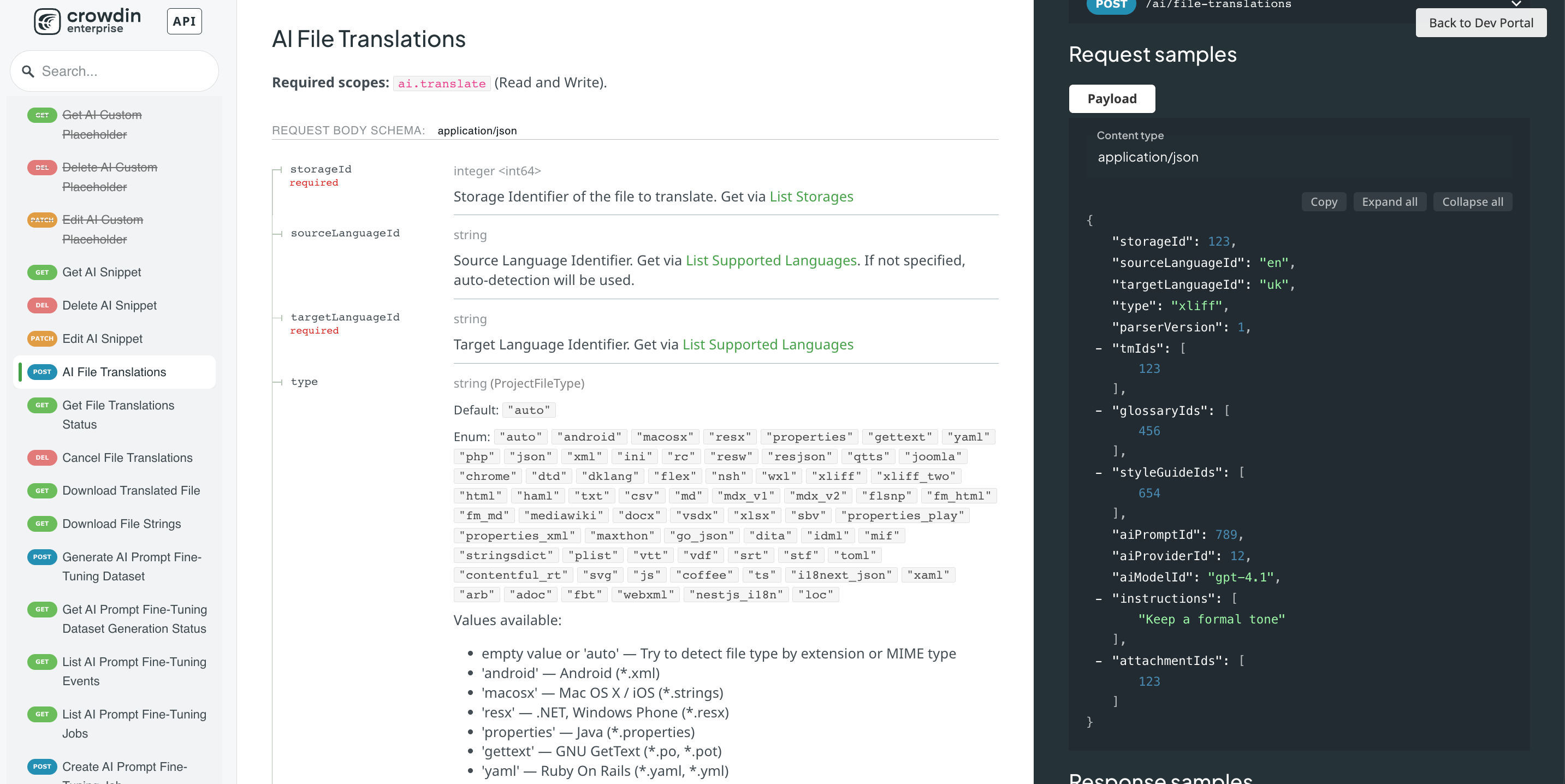
The AI section of Crowdin’s API has two calls for this:
AI Translate Strings (
POST /ai/translate): synchronous. Send up to 500 strings, get the translations back in the same response.AI File Translations (
POST /ai/file-translations): asynchronous. Upload a file, start a job and download the translated file in the same format when it’s ready.
Both calls take the same context: your AI prompt, translation memories (TMs), glossaries, style guides, additional instructions for this request and images for context!
Setup: what you need to start using it
You need a Crowdin API token. Create a personal access token first.
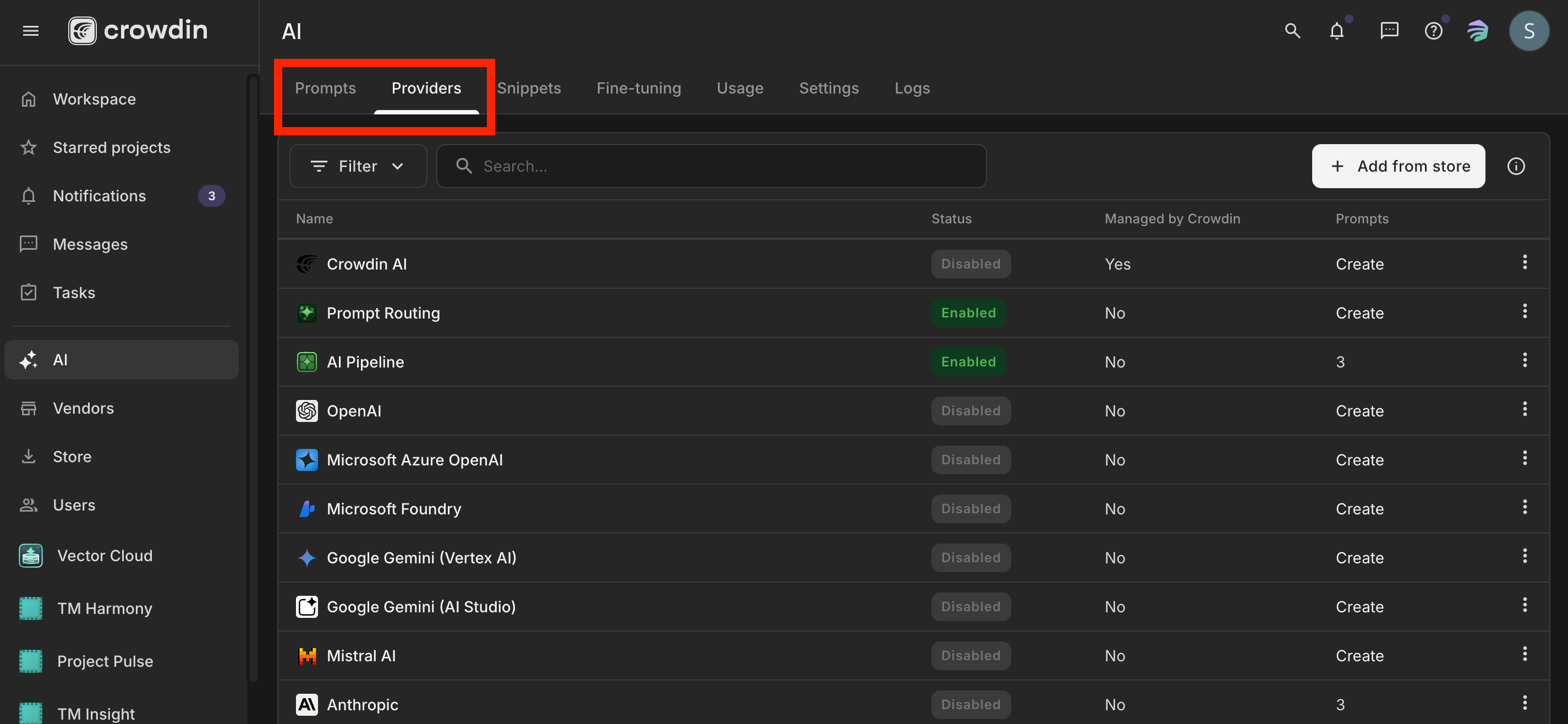
An AI provider. In Crowdin, under AI, enable a provider and add your own API key. I used my own Anthropic key, but Gemini or OpenAI is fine too.
A prompt for pre-translation. Check its settings too: style guides were off in mine, and the style guide in my request did nothing until I switched them on.
Everything else is already in Crowdin.
The examples below are plain Python with requests. Set this up once:
import os
import requests

API = "https://your-org.api.crowdin.com/api/v2"
HEADERS = {"Authorization": f"Bearer {os.environ['CROWDIN_TOKEN']}"}
I used Crowdin Enterprise. On crowdin.com, the AI calls are under your user instead: https://api.crowdin.com/api/v2/users/{userId}/ai/translate. Storage uploads stay at /storages.
API Call 1: AI Translate Strings
POST /ai/translate
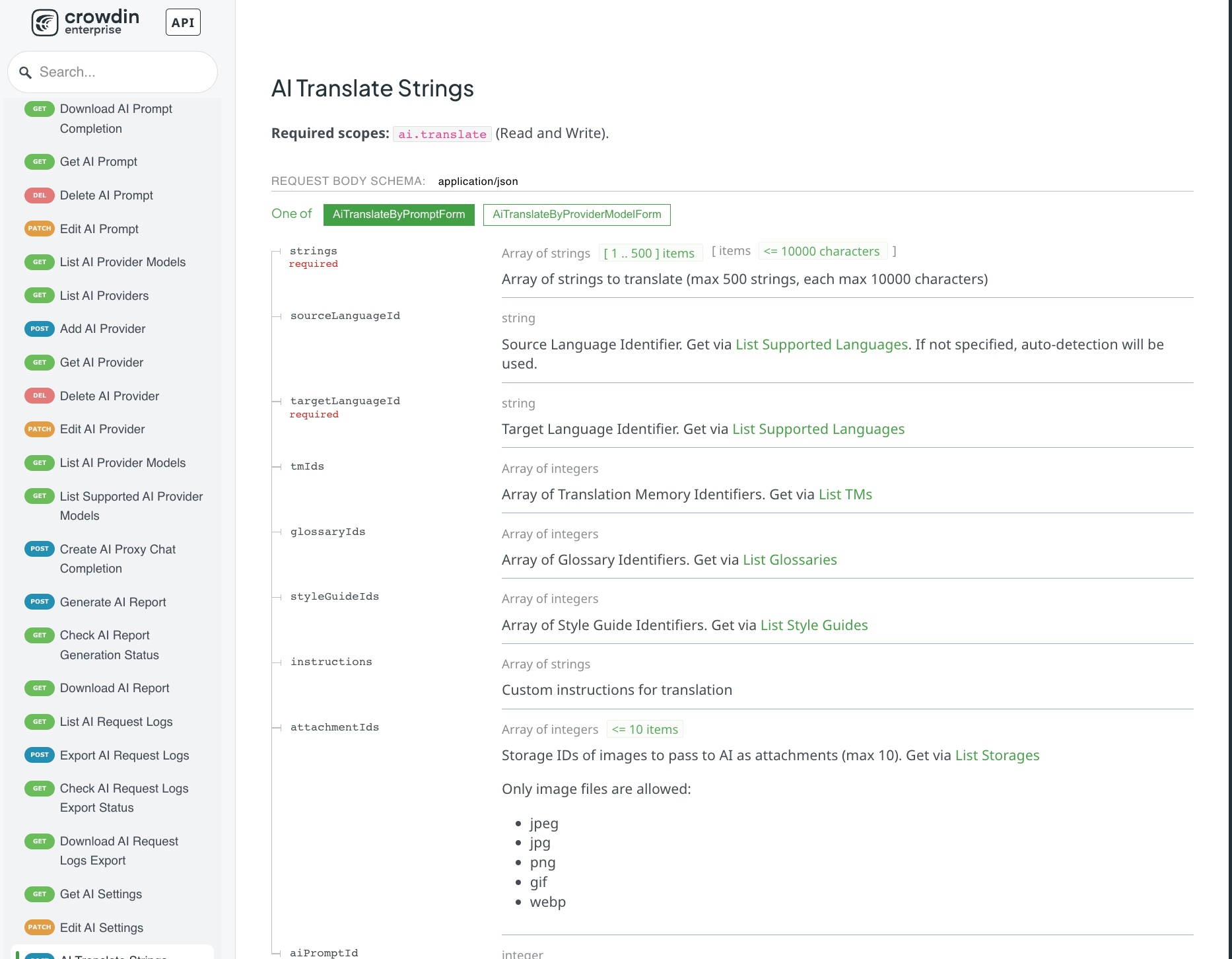
strings(required): up to 500 strings, each up to 10,000 characterstargetLanguageId(required): the language you want to translate intosourceLanguageId: optional, Crowdin can detect the languagetmIds,glossaryIds,styleGuideIds: your TMs, glossaries and style guidesinstructions: additional instructionsattachmentIds: imagesaiPromptId, oraiProviderId+aiModelId: the prompt or AI model you want to use
Here’s what the response looks like:
{
  "data": {
    "sourceLanguageId": "it",
    "targetLanguageId": "pl",
    "translations": ["...", "..."]
  }
}
Examples
Here are a few quick examples of how you could use it.
1: an Italian menu into Polish

A restaurant uploads its menu in Italian, and we want to show it in Polish.
menu = [
    "Bruschetta al pomodoro — pane tostato con pomodorini, basilico e olio extravergine.",
    "Tagliatelle al ragù della nonna — pasta fresca fatta a mano, ragù di manzo cotto per sei ore.",
    "Zuppa forte napoletana — piatto tradizionale, molto piccante.",
    "Coperto e servizio inclusi.",
    "Per allergie e intolleranze, chiedete al personale.",
]

response = requests.post(f"{API}/ai/translate", headers=HEADERS, json={
    "strings": menu,
    "sourceLanguageId": "it",
    "targetLanguageId": "pl",
    "aiPromptId": 38,

    # what the app already has in Crowdin
    "tmIds": [192],
    "glossaryIds": [192],
    "styleGuideIds": [10],

    # what we only know at request time
    "instructions": [
        "Restaurant menu shown on a mobile card.",
        "Keep traditional Italian dish names in Italian; translate only the description.",
    ],
})
response.raise_for_status()

for source, translation in zip(menu, response.json()["data"]["translations"]):
    print(f"{source}\n  -> {translation}\n")
Without the dish-name instruction, the names get translated too:
Bruschetta z pomidorami — opiekany chleb z pomidorkami, bazylią i oliwą z oliwek extra vergine.
Tagliatelle z ragù babci — świeży makaron robiony ręcznie, ragù z wołowiny duszone sześć godzin.
With it, dish names stay in Italian and only the descriptions are translated:
Bruschetta al pomodoro — opieczony chleb z pomidorkami, bazylią i oliwą z pierwszego tłoczenia.
Tagliatelle al ragù della nonna — świeży makaron robiony ręcznie, ragù wołowe duszone przez sześć godzin.
Zuppa forte napoletana — tradycyjne danie, bardzo ostre.
Opłata za nakrycie i obsługa wliczone.
W razie alergii i nietolerancji zapytaj obsługę.
2: only the dish name, with an image as context
If you just send “Zuppa forte” for translation without any extra context, it might not mean much to either AI or humans. An image like the one below can help the AI translate it.
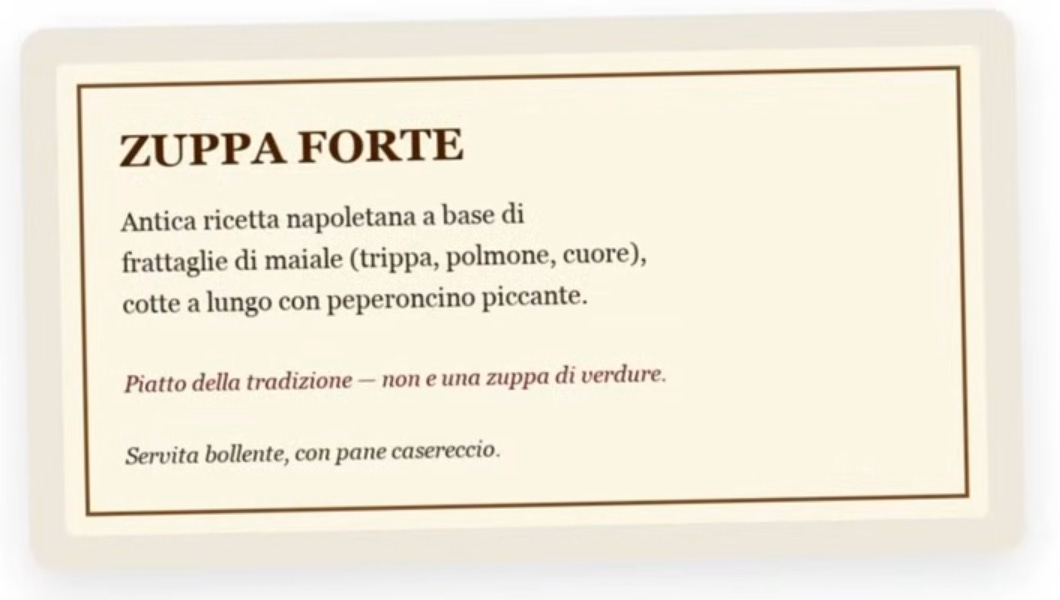
The dish description is printed on the image, so the model is basically reading the picture. You can attach the image to the request, and it should improve the AI output!
First, upload it to storage, then pass its id in attachmentIds:
with open("menu-card.png", "rb") as f:
    storage = requests.post(f"{API}/storages", headers={
        **HEADERS,
        "Crowdin-API-FileName": "menu-card.png",
        "Content-Type": "image/png",
    }, data=f)
storage.raise_for_status()
image_id = storage.json()["data"]["id"]

response = requests.post(f"{API}/ai/translate", headers=HEADERS, json={
    "strings": ["Zuppa forte"],
    "sourceLanguageId": "it",
    "targetLanguageId": "pl",
    "aiPromptId": 38,
    "tmIds": [192],
    "glossaryIds": [192],
    "styleGuideIds": [10],
    "attachmentIds": [image_id],
    "instructions": [
        "Menu item shown to customers. Add a short description of the dish in the "
        "target language, using only information given in this request. "
        "Do not add anything you know from elsewhere.",
    ],
})
response.raise_for_status()
Translation without an image:
Zuppa forte – mocna zupaWith an image:
Zuppa forte – dawna neapolitańska potrawa z podrobów wieprzowych (flaki, płuca, serce),
długo duszonych z ostrą papryczką chili. Danie tradycyjne, nie jest to zupa warzywna.
Podawana bardzo gorąca, z chlebem domowego wypieku.
3: content in any language
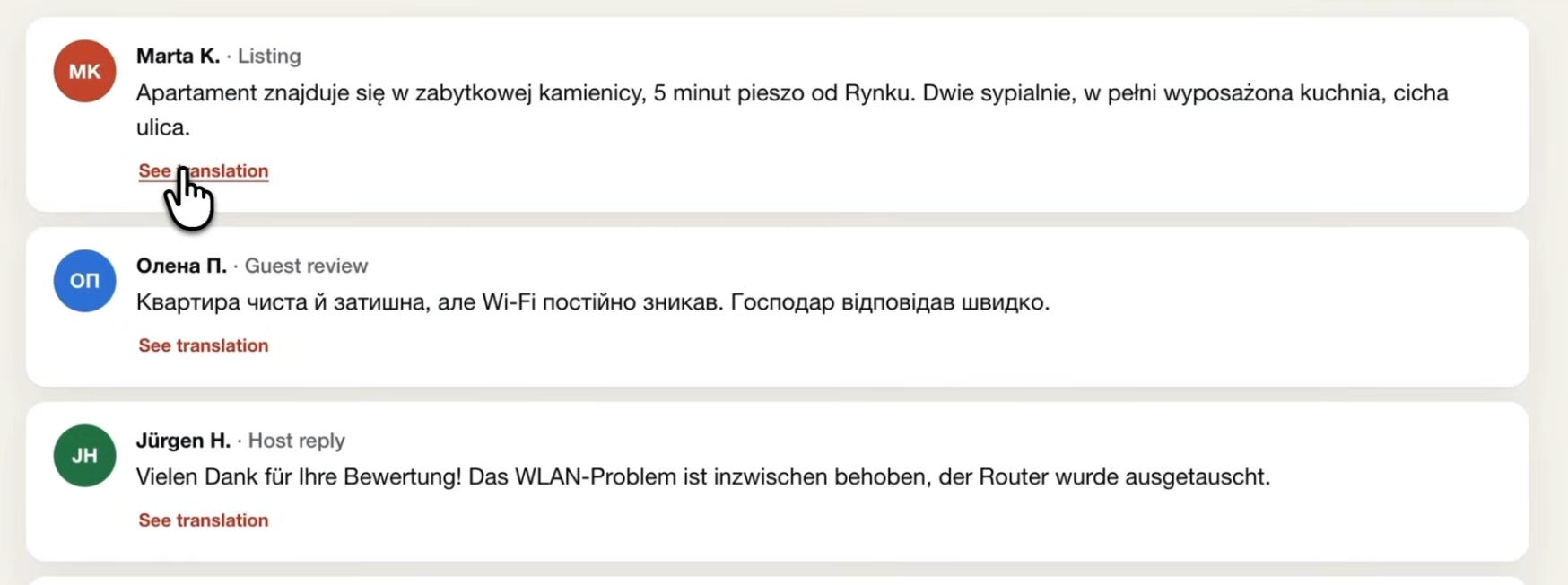
Now a different example, a short-term rental site. Listings, guest reviews, comments and host replies come in any language. We don’t know the language, so we don’t send it, and Crowdin identifies the source language for us.
posts = [
    "Apartament znajduje się w zabytkowej kamienicy, 5 minut spacerem od Rynku. ...",
    "Квартира була чиста і затишна, але Wi-Fi постійно зникав. ...",
    "Vielen Dank für Ihre Bewertung! Das WLAN-Problem ist inzwischen behoben. ...",
]

for post in posts:
    response = requests.post(f"{API}/ai/translate", headers=HEADERS, json={
        "strings": [post],
        "targetLanguageId": "en",   # no sourceLanguageId
        "aiPromptId": 38,
        "instructions": ["Keep each text under 300 characters: card limit."],
    })
    response.raise_for_status()
    data = response.json()["data"]
    print(data["sourceLanguageId"], "->", data["translations"][0])
pl -> The apartment is located in a historic tenement house, a 5-minute walk from the Market Square. ...
uk -> The apartment was clean and cosy, but the Wi-Fi kept dropping out. The host replied quickly.
de -> Thank you so much for your review! The Wi-Fi issue has since been fixed — the router has been replaced.4: user content that follows our terminology and style guide
A restaurant writes its listing in English, and we translate it into Polish with our own TM, glossary and style guide:
listing = [
    "Family trattoria in the old town. Handmade pasta, slow-cooked ragù and a short list of Neapolitan classics.",
    "Cover charge and service included.",
    "Free delivery on orders over €20.",
    "Add your favourites to the basket and choose pickup or delivery. Forkful Plus members pay no delivery fee.",
]
Rodzinna trattoria na starym mieście. Makaron robiony ręcznie, długo duszone ragù i krótka lista neapolitańskich klasyków.
Opłata za nakrycie i obsługa w cenie.
Darmowa dostawa przy zamówieniach powyżej 20 €.
Dodaj ulubione dania do koszyka i wybierz odbiór osobisty lub dostawę. Członkowie Forkful Plus nie płacą za dostawę.No matter what the current translations are, we can always quickly influence future AI translations by changing the style guide. Let’s say our translations are informal, but we’ve decided to switch to formal.
The localization manager opens the style guide in Crowdin and changes one line: Polish should be formal now. We send the same request again, and the first sentence of the last line changes from this:
Dodaj ulubione dania do koszyka i wybierz odbiór osobisty lub dostawę.To this:
Prosimy dodać ulubione dania do koszyka i wybrać odbiór osobisty lub dostawę.Nobody had to deploy anything or open a ticket for this. I like that the people who own translation quality can fix user content the same way they fix the product.
API Call 2: AI File Translations
POST /ai/file-translations
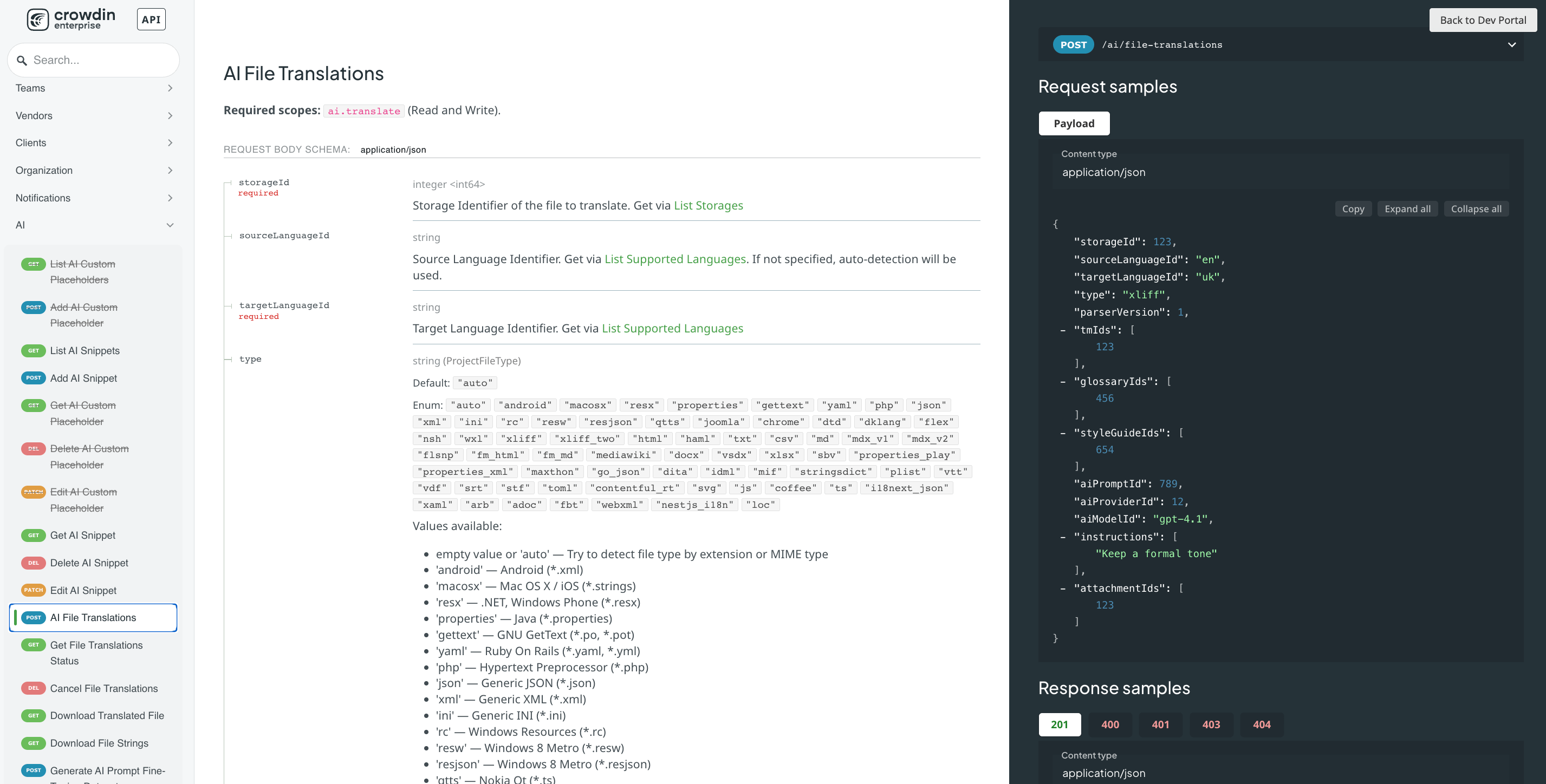
Similar concept, but for files. If your partners or users send files instead, you can use this one. Crowdin parses the file, translates only the parts that should be translated, and puts the file back in the same format. You send Markdown, you get Markdown back.
It’s async and follows these steps:
Upload the file to storage (
POST /storages)Start the job (
POST /ai/file-translations)Poll the job (
GET /ai/file-translations/{jobId})Download the result (
GET /ai/file-translations/{jobId}/download)
The parameters:
storageId(required): the uploaded filetargetLanguageId(required): the language to translate intosourceLanguageId: optional, Crowdin detects the language if you don’t provide ittype: optional, defaults toauto(detected from the extension or MIME type)parserVersion: optional, only together withtypetmIds,glossaryIds,styleGuideIds,instructions,attachmentIds: the same as in the strings callaiPromptId, oraiProviderId+aiModelId
Quick example:
import time

def translate_file(path, target, source=None):
    # 1. upload
    with open(path, "rb") as f:
        storage = requests.post(f"{API}/storages", headers={
            **HEADERS,
            "Crowdin-API-FileName": os.path.basename(path),
            "Content-Type": "application/octet-stream",
        }, data=f)
    storage.raise_for_status()

    # 2. start the job
    body = {
        "storageId": storage.json()["data"]["id"],
        "targetLanguageId": target,
        "aiPromptId": 38,
        "tmIds": [192],
        "glossaryIds": [192],
        "styleGuideIds": [10],
        "instructions": [
            "Content supplied by a partner restaurant, published in our app.",
            "Keep traditional Italian dish names in Italian; translate descriptions.",
        ],
    }
    if source:
        body["sourceLanguageId"] = source
    job = requests.post(f"{API}/ai/file-translations", headers=HEADERS, json=body)
    job.raise_for_status()
    job_id = job.json()["data"]["identifier"]

    # 3. poll every 3 seconds, give up after 5 minutes
    for _ in range(100):
        status = requests.get(f"{API}/ai/file-translations/{job_id}", headers=HEADERS).json()["data"]
        error = status["attributes"].get("error")
        if error:
            raise RuntimeError(f"Failed at {error['stage']}: {error['message']}")
        if status["status"] == "finished":
            break
        time.sleep(3)
    else:
        raise TimeoutError(f"Job {job_id} still {status['status']} after 5 minutes")

    # "finished" doesn't mean "translated", see below
    report = status["attributes"].get("validationReport") or {}
    if report.get("applied", 0) == 0 or report.get("skipped", {}).get("empty_translation", 0) > 0:
        raise RuntimeError(f"Translation failed silently: {report}")

    # 4. download: a short-lived signed link, no auth header on the second request
    link = requests.get(f"{API}/ai/file-translations/{job_id}/download", headers=HEADERS).json()["data"]["url"]
    result = requests.get(link)
    result.raise_for_status()
    return result.content
Two ways to get the translated files back
GET /ai/file-translations/{jobId}/downloadgives you a link to the translated file, in the same format as the sourceGET /ai/file-translations/{jobId}/translationsgives you a link to the source and target as JSON. Use it if you don’t need a file back and want to write the text into your database or something.
Example: a partner menu in Markdown
The source, Italian:
## Antipasti
- **Bruschetta al pomodoro** — pane tostato con pomodorini, basilico e olio extravergine.

## Primi piatti
- **Tagliatelle al ragù della nonna** — pasta fresca fatta a mano, ragù di manzo cotto per sei ore.

## Informazioni utili
Coperto e servizio inclusi. La cucina chiude alle 23:00.
Per allergie e intolleranze, chiedete al personale: possiamo adattare quasi tutti i piatti.
The result, German:
## Vorspeisen
- **Bruschetta al pomodoro** — geröstetes Brot mit Kirschtomaten, Basilikum und extra nativem Olivenöl.

## Erste Gänge
- **Tagliatelle al ragù della nonna** — frische handgemachte Pasta, Rinderragù, sechs Stunden gekocht.

## Nützliche Informationen
Gedeck und Service inbegriffen. Die Küche schließt um 23:00 Uhr.
Bei Allergien und Unverträglichkeiten fragen Sie bitte das Personal: Wir können fast alle Gerichte anpassen.
It’s the same TM, glossary and style guide as in the strings call.
Which file formats can be translated
Documents: docx, pptx, md, odt, html, txt, idml, mif, dita
Spreadsheets and data: csv, xlsx, json, xml, yaml, xliff
Subtitles: srt, vtt, sbv
Localization formats: android, macosx, properties, gettext, resx, arb, i18next_json
AI translation quality without reviewers
AI translations aren’t perfect, and they are going to make mistakes. With good style guides and glossaries, we can reduce some of the risk, but it’s still AI translation without any human review. Just keep that in mind.
What I like is that all of it lives in Crowdin and the localization team owns it.
Before you put this in production
As with any technology, test it yourself before you push it to production.
LLMs are not fast
These are AI calls, so they’re not instant. Check how fast they are for you.
A failed call can look like a success
When the AI provider in my Crowdin was switched off, the strings call still returned HTTP 200, just with empty translations. The file job said finished and gave me back the untranslated source file. So check for empty translations, and for files check applied and empty_translation in the validation report. The actual error was only in GET /ai/request-logs.
Store and cache the results yourself
Nothing is stored in a Crowdin project, so if you want to keep these translations, you have to store them yourself.
Limits
500 strings per strings call, 10,000 characters each
10 images per request
20 concurrent API requests per account
What could you use this for?
a “See translation” button under reviews, comments and forum posts
menus, listings and product pages
support tickets and chat translated for support agents
partner and supplier files
internal translations when you want to translate something quickly
My take
I think the main idea here is that you do it inside Crowdin. You can pull your TMs, glossaries and style guides, so you don’t have to manage your data a second time for DeepL or another engine.
I’d keep the platform you already pay for and automate around it, and this is a good example of that. The expensive part is the glossary, the TM and the style guide, and you already have those. Somebody on your team spent years building them, and you should use that data, because these days it’s all about good quality data. The API calls are the easy part.
Two things I’d do from the start. This isn’t reviewed translation, so for legal text, safety info or anything where a mistake costs money, I’d still use a project with a human reviewer. And I’d add the empty-translation check on day one, because a failed call can look exactly like a successful one.
Links
Endpoints. On Crowdin Enterprise they’re on your organization’s domain (https://{your-org}.api.crowdin.com/api/v2). On crowdin.com, the AI calls are under your user (https://api.crowdin.com/api/v2/users/{userId}/ai/...), and storage stays at /storages.
Translate strings:
POST /ai/translateStart a file translation:
POST /ai/file-translationsJob status:
GET /ai/file-translations/{jobId}Cancel a job:
DELETE /ai/file-translations/{jobId}Download the translated file:
GET /ai/file-translations/{jobId}/downloadDownload source and target pairs:
GET /ai/file-translations/{jobId}/translationsUpload to storage:
POST /storagesPrompts and providers:
GET /ai/prompts,GET /ai/providersAI request logs:
GET /ai/request-logsAI reports:
POST /ai/reports
Docs for Crowdin Enterprise:
AI Translate Strings: https://support.crowdin.com/developer/enterprise/api/v2/#operation/api.ai.translate.strings.post
AI File Translations: https://support.crowdin.com/developer/enterprise/api/v2/#operation/api.ai.file-translations.post
Docs for crowdin.com:
AI Translate Strings: https://support.crowdin.com/developer/api/v2/#operation/api.users.ai.translate.strings.post
AI File Translations: https://support.crowdin.com/developer/api/v2/#operation/api.users.ai.file-translations.post
Plain-text API specs, useful if you build this with a coding agent:
Crowdin Enterprise: https://support.crowdin.com/_llms-txt/api/enterprise/file-based.txt
crowdin.com: https://support.crowdin.com/_llms-txt/api/crowdin/file-based.txt
API clients: JavaScript, Python, PHP, Java, Go, Ruby, .NET, all on Crowdin’s GitHub